

Most people in a finance team start every Claude conversation the same way: pasting in the house style, explaining what counts as a material variance, reminding it to use US dollars and not to make up causes. Projects fix that. You set the context once, and every conversation in the project starts with it.
Projects also create a new risk. Whatever you put in one is used in every conversation inside it, by everyone it’s shared with, until someone takes it out. This guide covers how to set one up for finance work, what to put in it, and how to keep it from becoming a liability.
Product details in this guide were last checked against Anthropic’s official help pages in October 2026. Plans and features change often, so confirm on the vendor’s site before you buy or configure anything.
What a project is
Anthropic describes projects as self-contained workspaces with their own chat histories and knowledge bases. Each one has two parts you control:
- Project instructions: standing guidance that applies to every chat in the project.
- Project knowledge: files and text that Claude uses as context in every chat in the project.
| What Anthropic says | |
|---|---|
| Who can use projects | All plans. Free accounts are limited to five projects |
| Large knowledge bases | On paid plans, when project knowledge approaches the context limit, Claude switches automatically to searching it (retrieval), expanding capacity by up to 10 times. You’ll see an indicator when this is on |
| File size | Up to 30 MB per file in a project |
| Sharing | Team and Enterprise only, with two permission levels: Can view and Can edit |
| Memory | Each project has its own separate memory, kept apart from other projects and from chats outside projects. On Team and Enterprise, the organization’s owners decide whether memory is available |
Step 1: Choose the right job
A project earns its keep when the same reference material is needed again and again. Organize by recurring job, not by person or client:
- Good: “Month-end variance commentary”, “Board pack drafting”, “Lease review”.
- Not useful: “Sam’s project” (it disappears when Sam is on leave), or a project for something you do once a year (the context goes stale between uses).
Start with two projects: the job you do most often and the one you most dislike. Two that work will teach you more than eight half-built ones. Name each so a colleague who inherits it understands what it’s for. If you’ve tried our guides to contract review or board reporting, either makes a good first project: the prompts that worked go straight into the instructions.
Step 2: Write the instructions
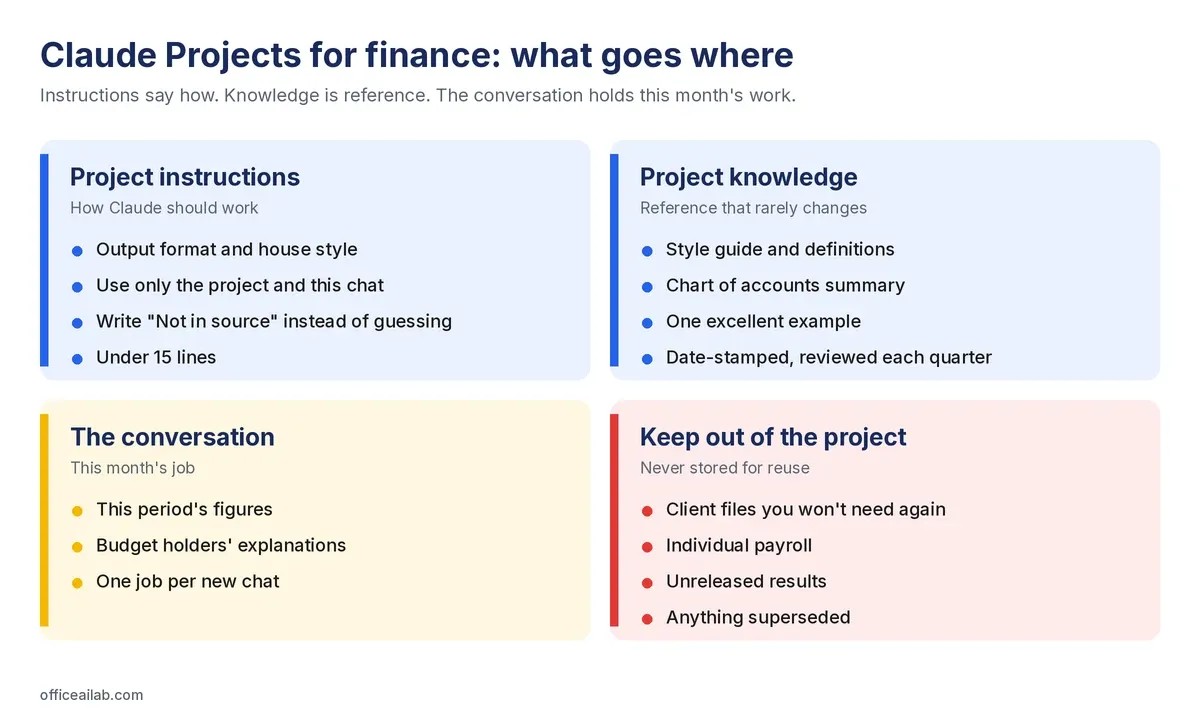
Instructions say how Claude should work. The conversation says what to do this time. Keep the task itself out of the instructions, or the project only works for one job.
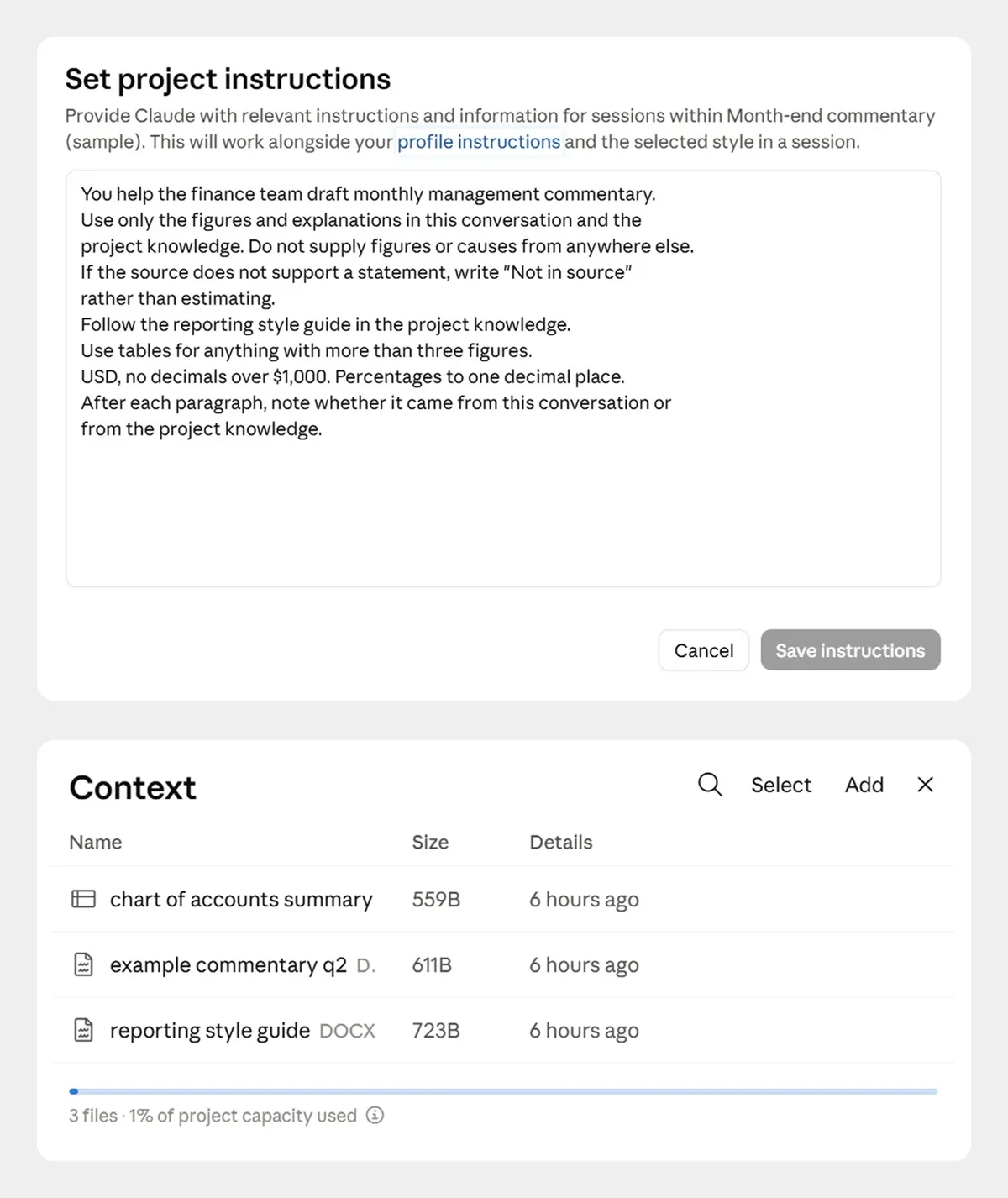
Here’s the set I’d start a finance project with:
You help the finance team draft monthly management commentary.
Use only the figures and explanations in this conversation and the
project knowledge. Do not supply figures or causes from anywhere else.
If the source does not support a statement, write "Not in source"
rather than estimating.
Follow the reporting style guide in the project knowledge.
Use tables for anything with more than three figures.
USD, no decimals over $1,000. Percentages to one decimal place.
After each paragraph, note whether it came from this conversation or
from the project knowledge.
The second and third lines are the most valuable for finance work. Set once, they apply to every conversation anyone has in that project. Keep the whole thing under about 15 lines. Long instruction blocks are harder to debug when the output goes strange.
Step 3: Add reference material, not working data
Project knowledge is for things that rarely change:
- Your reporting style guide.
- Definitions: what counts as a material variance, how you define recurring revenue, which entities roll up where.
- A summary of the chart of accounts.
- One example of an excellent finished output. A single good example shapes results more reliably than paragraphs of instructions about tone.
A project isn’t a folder for everything. It’s a reusable workspace: if a file is only needed once, it belongs in the chat, not the project. This month’s figures belong in the conversation, not the project. Put a date and an owner on anything that can go stale (“Correct as at 1 October. Owner: Finance Director”), so the next person can judge whether it’s still current.
What to keep out
Project files stay available in every conversation until someone removes them, including for anyone the project is shared with later. Deleting a conversation doesn’t remove them. So keep out client files you won’t need again, individual payroll, unreleased results and superseded versions of anything. If it’s needed for one job, upload it to that conversation instead. Long reference files, such as a lease or a policy manual, work better in a conversation using our method for analyzing long documents with Claude. Our pre-upload check applies to project files too.
Step 4: Share it, on a business plan
On Team and Enterprise, a project can be kept private, shared with named people, or shared with the whole organization. Anthropic’s two permission levels are:
- Can view: see the contents, knowledge and instructions, and chat in the project, but not change anything.
- Can edit: change the instructions and knowledge, and manage who has access.
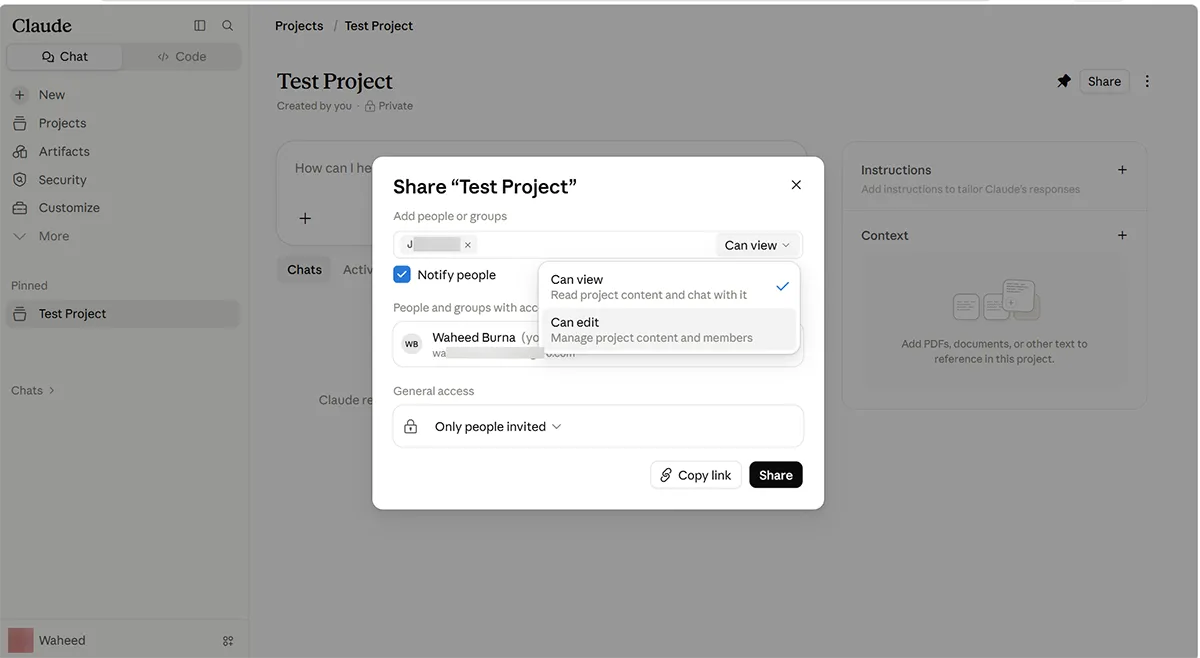
Give Can edit to one or two people and Can view to everyone else. A project with ten editors and no owner fills up with files nobody remembers adding. As an admin, it’s also worth knowing that organization owners can turn project sharing off for the whole organization, or on Enterprise for specific roles. For the other settings a firm should decide up front, see our guide to Claude for accounting firms and finance teams.
Step 5: Keep it trustworthy
Four habits keep a project useful after the first month:
- Start each job in a new conversation. Long threads carry earlier assumptions forward, and a mistake from twenty messages ago quietly persists.
- Count rows out against rows in. Give it 47 lines and get 45 back, and nothing announces the two that vanished.
- Collect the prompts that worked into a file in the project. Over a few months this becomes your team’s own playbook.
- Review the project knowledge every quarter. Put it in a calendar with a named owner. Nobody does it spontaneously, and an outdated rate or threshold is treated as current until someone notices.
The quarterly review in five questions
| Check | Question to ask |
|---|---|
| Owner | Is the named owner still the right person? |
| Files | Is any file out of date or replaced by a newer version? |
| Instructions | Are the rules still right for how the team works now? |
| Sharing | Does everyone with access still need it, and at the right permission level? |
| Output | Are people still checking results against the source? |
How we tested this
We built a month-end commentary project on a Claude Pro account with the instructions above and three sample files for a fictional firm: a one-page reporting style guide, a chart of accounts summary and an example of good commentary. We then asked it to draft commentary from a sample set of figures, the same method described in our guide to Claude for board reporting. The sharing screenshot comes from our Enterprise account, where I’m the admin.
For a step-by-step checklist covering project setup, instructions, habits and a four-to-six-week pilot, download our free guide to setting up Claude Projects for a finance team.