
I’m an IT manager. At work I administer Claude Enterprise and ChatGPT Business for a SaaS company, and I use Claude Pro on my own account. I’ve set up the single sign-on, the group-based provisioning and the spend limits, and I’ve watched what people actually do with these tools once they have them. This guide is what I’d hand an accounting firm or a finance team that’s deciding how to use Claude properly.
It covers the work Claude does well, the work it shouldn’t touch, which plan a firm actually needs, what to settle about client data before anyone uploads a file, and how to set it up so it’s still under control six months from now.
Product details in this guide were last checked against Anthropic’s official help pages in October 2026. Plans and features change often, so confirm on the vendor’s site before you buy or configure anything.
Who this guide is for
- Accounting firm owners deciding whether, and how, staff should use Claude.
- Finance leads who want the speed without invented numbers.
- IT and admin people setting Claude up so it stays under control.
- Anyone replacing personal AI accounts with a setup the firm controls.
It isn’t legal advice on whether a particular client document can be uploaded, and it doesn’t replace audit sign-off or human review of final reporting.
The short version
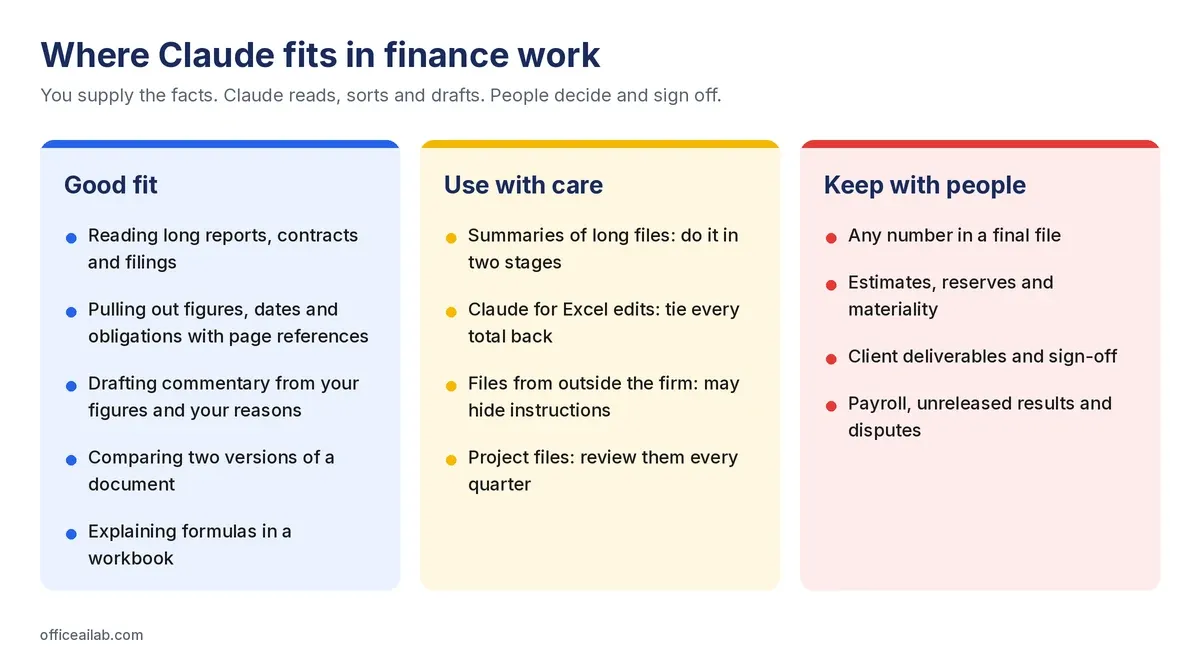
- Claude’s strength is reading. Long reports, contracts, policy manuals and filings are where it saves the most time, as long as you make it show where every answer came from.
- It drafts well and decides badly. Use it for commentary, summaries and first drafts. Keep estimates, judgments and sign-off with people.
- Personal and business accounts handle data differently. On Free, Pro and Max you choose whether your chats can be used for training. Business plans aren’t trained on your content by default.
- For a firm, the account question comes first. Staff using personal accounts for client work is the most common risk, and a policy alone doesn’t fix it.
What Claude is good at in finance work
| Work | What Claude does | What stays with you |
|---|---|---|
| Long documents | Maps the structure of an annual report, agreement or filing, pulls out every figure, date and obligation with page references, and answers specific questions with citations | Checking every quote and page reference against the source |
| Contract and lease review | Extracts terms, compares two versions, flags clauses that differ from your standard, lists obligations and deadlines | Deciding what a clause means for the client, and anything that needs a lawyer |
| Board and management reporting | Turns your figures and your explanations into draft commentary, restructures packs, tightens wording | Every number and every cause it writes about |
| Reusable context | Projects hold your chart of accounts, house style and a good example, so you stop re-explaining them in every conversation | Keeping project contents current |
| Spreadsheets | Claude for Excel explains formulas with cell references, traces errors and updates assumptions while keeping formulas intact | Testing the result before it reaches a client |
The common thread: you supply the facts, Claude does the reading, sorting and drafting. When a task fits that pattern, it’s usually a good use.
The numbers that matter for long files
On paid plans Claude’s standard working memory (its context window) is 200,000 tokens, which Anthropic puts at roughly 500 pages of text, and several of its newest models handle 1 million tokens. PDFs can be up to 1,000 pages. There’s one limit that catches finance teams out: Anthropic says PDFs over 100 pages get text-only processing, so charts and tables saved as images in a long annual report aren’t read. If the figure you need sits in a chart, check it yourself or upload just those pages. Our free guide to long-document analysis sets out a method for working through 200-page files.
What Claude shouldn’t do
- Be the source of a number. Every figure in a finished file should trace back to your ledger or your spreadsheet.
- Explain something you haven’t explained to it. Ask why a cost rose and it will give a plausible reason that didn’t come from your books. Give it the reason; let it write.
- Make judgment calls. Reserves, accrual estimates, capitalization decisions and materiality need a person who can defend them.
- Open files you don’t trust. Anthropic’s own guidance for Claude for Excel warns that files from outside sources can contain hidden instructions designed to manipulate it. A vendor’s spreadsheet or a downloaded template counts.
- Produce client deliverables nobody reviewed. Anthropic says the same about its Excel add-in: not for final client deliverables without human review, or audit-critical calculations without verification.
Which Claude plan a firm needs
| Free, Pro, Max (personal) | Team | Enterprise | |
|---|---|---|---|
| Training on your chats | Your choice, in privacy settings | Not by default | Not by default |
| Single sign-on (SSO) | No | Yes | Yes |
| Automatic user provisioning (SCIM) | No | No | Yes |
| Groups and group spend limits | No | Organization-wide limit only | Yes |
| Audit logs and custom data retention | No | No | Yes |
| Who owns the account | The person | The firm | The firm |
The last row matters most. When a staff member uses a personal Pro account for client work, the firm has no way to see what was uploaded, can’t remove it when they leave, and can’t change their settings. For a firm of any size, a business plan is the cleaner answer. Team covers most small firms. Enterprise is worth it when you need provisioning from your identity provider, per-group spend control, audit logs or your own retention rules. Prices change often, so check Anthropic’s pricing page rather than any figure quoted in an article.
Data safety: what to settle before anyone uploads a client file
On personal accounts
Free, Pro and Max users choose whether their chats can be used to improve Claude, under Settings → Privacy. If you allow it, Anthropic says it may keep chats in a de-identified form for up to five years for training. When you delete a chat, it leaves your history straight away and Anthropic’s systems within 30 days. Incognito chats aren’t used for training, whatever that setting says. If anyone in your firm uses a personal account for work, that setting is the first thing to check.
On business accounts
Anthropic says it doesn’t train on Team, Enterprise or API content by default. Chats stay in the account so people can return to them, and when someone deletes one, it’s removed from Anthropic’s systems within 30 days. Enterprise plans can set their own retention period. There’s one exception to know about: if someone uses the thumbs up or down buttons to send feedback, that conversation can be kept for five years and used for training. Admins can switch off rating under Organization settings → Data and Privacy. I turned it off on day one.
Whatever the account
- Replace client names with codes before uploading.
- Delete columns the question doesn’t need.
- Open every tab, including hidden ones, and accept or reject tracked changes first.
- Read the engagement letter. Some restrict sharing client data with third-party services.
- Keep individual payroll, unreleased results and anything under dispute out entirely.
Our free pre-flight check for Claude puts all of this on one page you can pin up.
Claude for Excel: useful, with care
Claude for Excel is an add-in that works inside your workbook. Anthropic lists it as generally available on Pro, Max, Team and Enterprise plans, running in Excel on the web, Excel for Windows with Microsoft 365, and Excel for Mac. It can explain how a number was calculated with clickable cell references, trace errors to their source, update assumptions while keeping formulas intact, and build or fill in templates.
What finance teams should know before relying on it:
- It asks before risky changes and warns before overwriting data. Read those confirmations, especially on files that came from outside the firm.
- Data tables, macros and VBA aren’t supported.
- Chat history is stored in your browser, not on Anthropic’s servers. It doesn’t sync between devices.
- On Enterprise, its activity isn’t in the audit logs and it doesn’t follow your custom retention settings. Anthropic says sessions are covered by the Compliance API, in public beta.
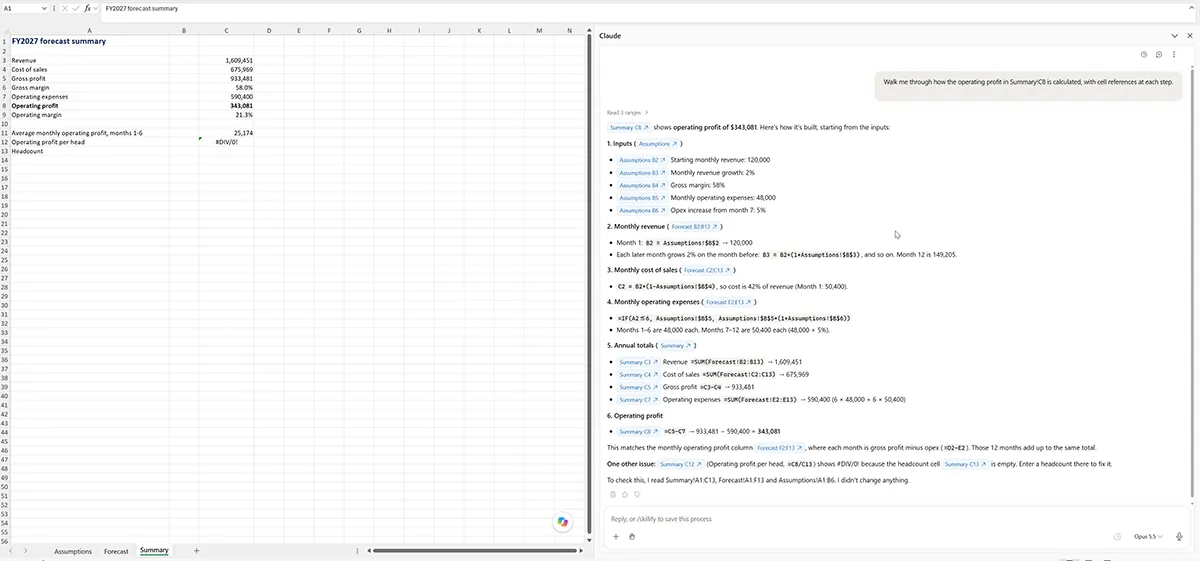
The rule is the same as anywhere else: let it build the draft, then tie every total back before the file leaves your hands. Our free AI output verification checklist covers what to check. If your firm also uses Copilot in Excel, our comparison of the Copilot side pane and the COPILOT function explains how Microsoft’s tools work in the same workbook.
Setting it up for a team
This is the part most firms skip, and the part that decides whether Claude is still under control a year from now. Here’s what I’d do, in this order:
- Decide who gets access, and manage it from your identity provider. On Enterprise, I provision users from Microsoft Entra ID group membership through SCIM, so being added to the group gives someone a seat and leaving it takes the seat away. Offboarding then happens automatically, with no one having to remember it.
- Turn on single sign-on so nobody signs in with a separate password, and their account follows them out the door.
- Set spend limits. Team has an organization-wide monthly limit on extra usage. Enterprise adds limits per group, which is how you stop one heavy user, or one curious department, from spending the whole budget.
- Switch off chat rating if you don’t want feedback conversations kept for five years.
- Deploy the Excel add-in centrally through the Microsoft 365 admin center, rather than leaving everyone to install it. One snag I’d flag for other admins: Anthropic notes that if your admin roles are activated through Entra Privileged Identity Management, the Integrated apps page won’t recognize them and deployment fails. Use an account with the role permanently assigned.
- Write a one-page policy: which account, which files, who to ask. Then actually tell people.
A first 30 days for a small firm
| Week | What to do |
|---|---|
| 1 | Choose the plan, set up SSO and spend limits, switch off chat rating, write the one-page policy |
| 2 | Pick two or three people and one repeat task each. Time the task the old way first |
| 3 | Run the task with Claude. Check every output against the source and record how long the checking took |
| 4 | Compare honestly. Keep what saved time after checking, drop what didn’t, then build a Project for whatever worked |
The most useful thing you’ll learn in that month is which tasks Claude actually saves time on in your firm, once you include the time it takes to check its work. That’s different for every practice, and it’s the only basis for deciding how far to roll it out.
If your firm uses ChatGPT as well, the same habits apply there. Our guide to ChatGPT for month-end close shows them on variance commentary and reconciliation exceptions.