
Board and management reporting is where finance teams spend hours on wording. The numbers are done, but the commentary still has to explain them clearly to people who weren’t in the detail. Claude is good at that writing. It’s also capable of producing a smooth, believable sentence that isn’t true, and in a board pack that sentence reads exactly like the true ones around it.
This guide sets out a way of working that gets the speed without that risk: Claude drafts and checks, and every number and every reason comes from you. It builds on the principles in our guide to Claude for accounting firms and finance teams.
This is a workflow guide, not legal, tax, audit or accounting advice. Follow your firm’s policies, your clients’ engagement terms and your own professional judgment before uploading client material or relying on AI output. Product details in this guide were last checked against Anthropic’s official help pages in October 2026. Plans and features change often, so confirm on the vendor’s site before you buy or configure anything.
The one rule: Claude doesn’t supply causes
Ask Claude why professional fees are over budget and it will give you a reason. It will be plausible, well written and invented, because nothing in your figures says why. The fix is simple and it goes in every prompt: use only the figures and explanations I’ve given you, and say so when an explanation is missing.
In board reporting, a made-up explanation is more dangerous than a bad sentence. It sounds professional, and nobody knows it’s invented unless they go back to the source.
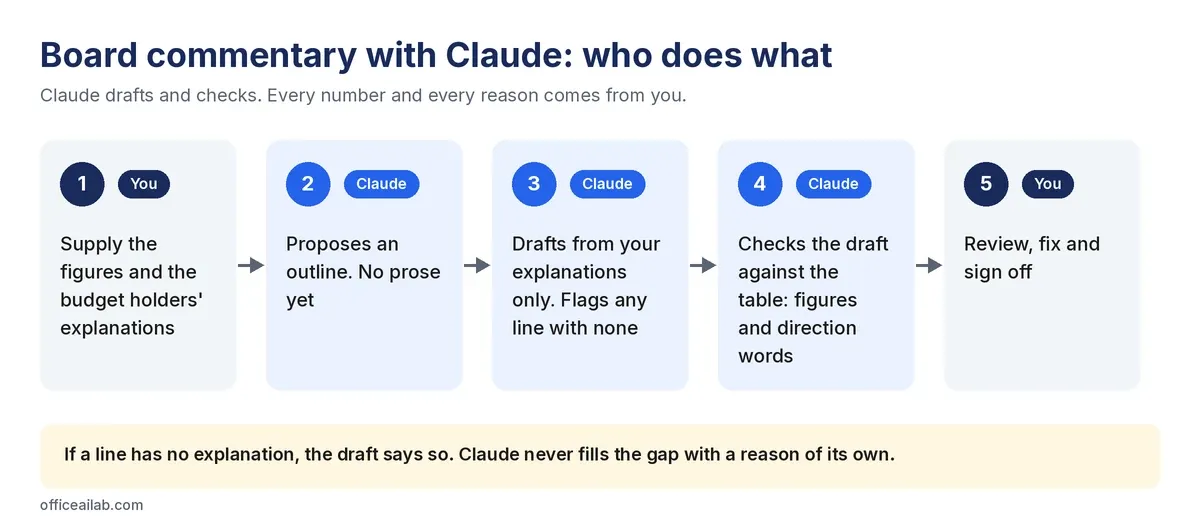
Step 1: Gather the facts first
Before you open Claude, have two things ready:
- The figures: actual, budget, variance and prior period for each line, from your ledger or reporting workbook.
- The explanations: what each budget holder told you about their variances, in their words.
If an explanation hasn’t come in yet, leave the line blank rather than guessing. Claude will flag it, which is better than a guess dressed up as commentary. If an explanation depends on a long source document, such as a lender’s report or last year’s annual report, use the page-referenced method in our guide to analyzing long documents with Claude.
A management pack is unreleased financial information. Don’t put it into a personal AI account unless your firm has approved that. Use your firm’s business account and take out anything the commentary doesn’t need, such as individual salaries. Our pre-upload check covers the rest.
Step 2: Get an outline before any prose
Here is the management pack for Q3. Propose an outline for a two-page
board summary: section headings and, under each, the two or three points
worth making. Do not write any prose yet. Use only what is in the pack.
Fixing structure at this stage takes a minute. Fixing it after Claude has written 800 words means rewriting most of them. Move sections around, cut points, then ask for the draft.
Step 3: Draft commentary from your explanations only
Write variance commentary for each line on the P&L tab with a variance
over $10,000, leaving out subtotals and totals. One short paragraph per line: the figure first, then the
cause, then what changes next period. Use only the explanations on the
Explanations tab. If a line has no explanation, write "Explanation not
yet received" and do not suggest a cause.
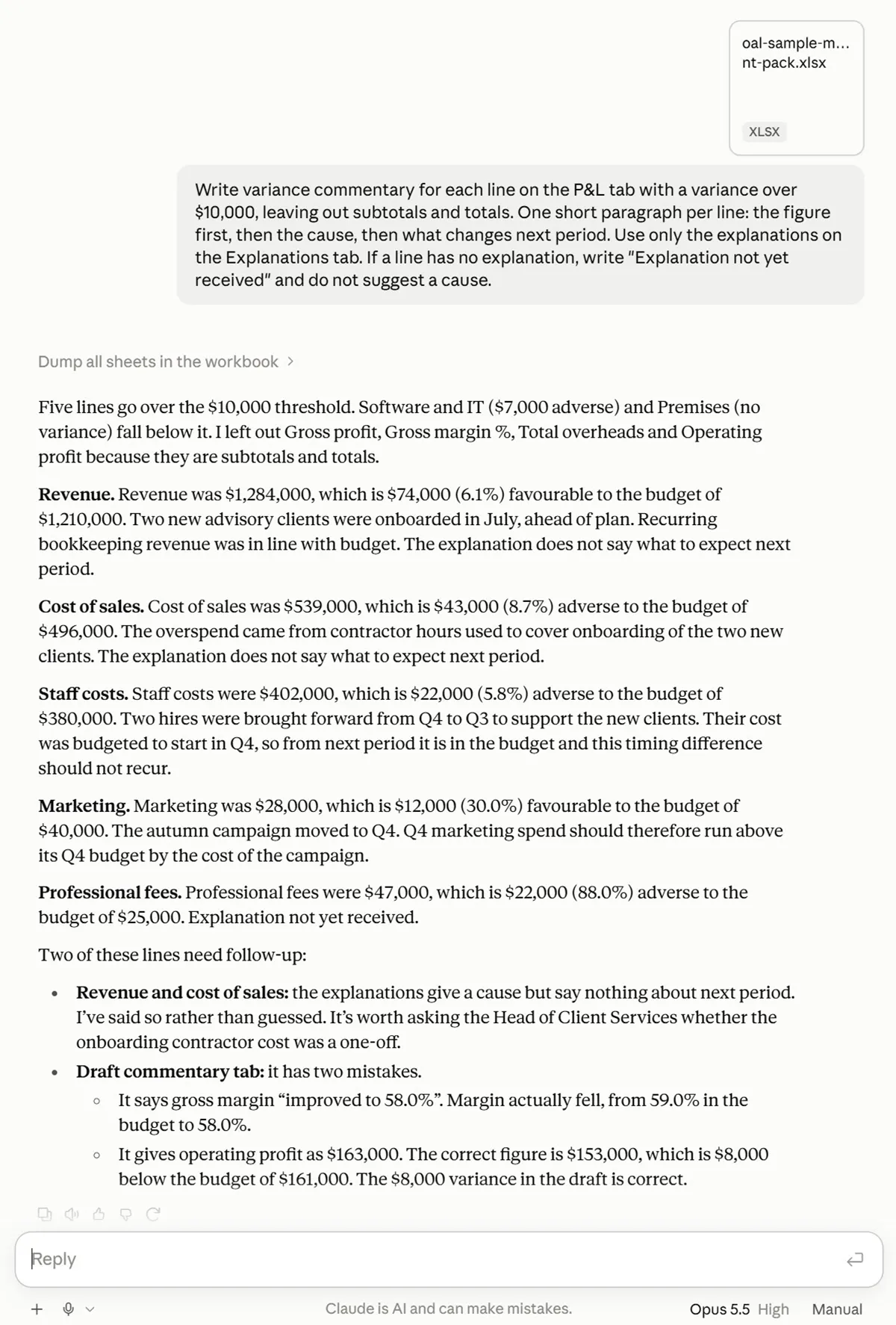
Three details in that prompt do most of the work:
- A threshold (“over $10,000”) stops it writing about every line.
- A fixed order (figure, cause, what’s next) gives you consistent paragraphs that are easy to check.
- The last sentence is the guardrail. Without it, the professional fees line gets a confident cause nobody gave.
The same guardrail works in other tools. Our guide to ChatGPT for month-end close uses it for flux commentary.
Step 4: Make Claude check the draft against the table
This is the step most teams skip, and it’s the one that catches the errors that survive human proofreading. Whether Claude wrote the draft or a colleague did, paste it in with the figures:
Here is the draft commentary and here is the table it describes. List
every figure in the commentary that does not match the table, and every
direction word (up, down, improved, ahead, behind, over, under) that
contradicts it. Quote the sentence for each one. Do not rewrite anything.
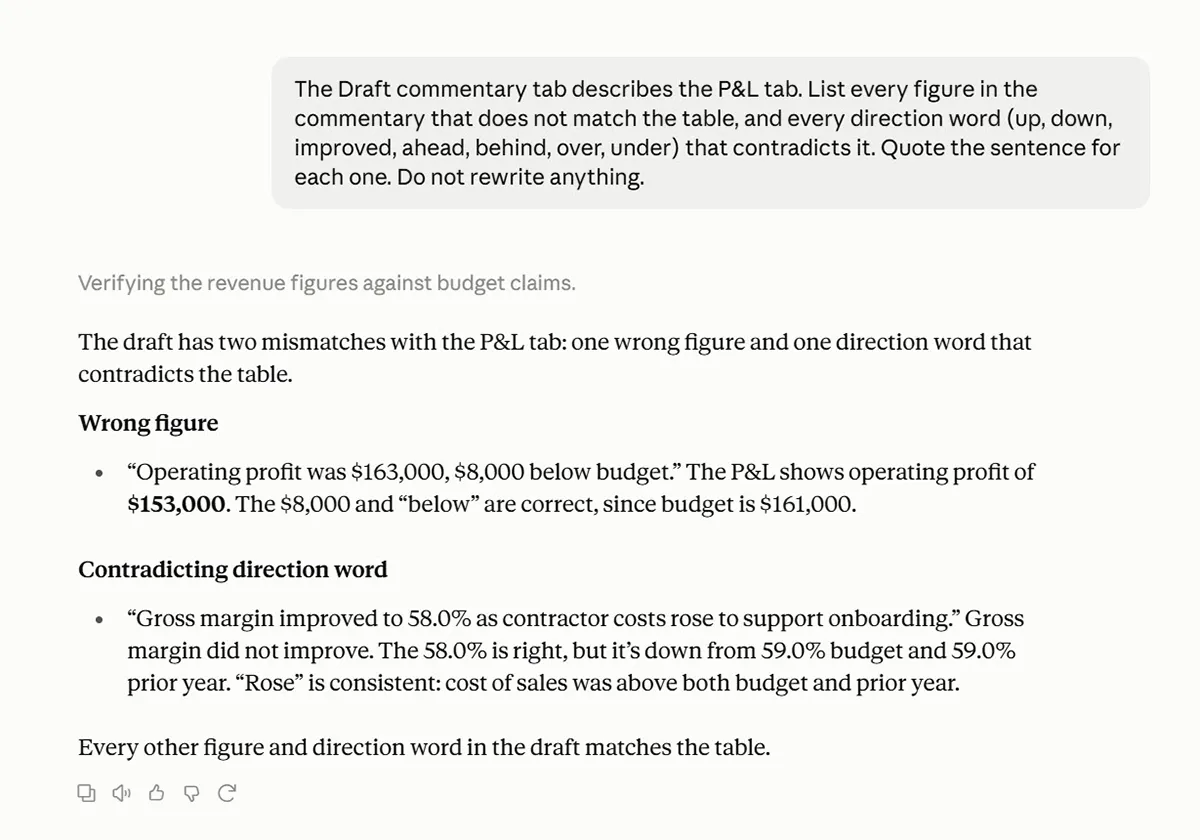
Direction errors are the dangerous ones. “Margin improved to 58.0%” looks right because 58.0% is the correct figure. The word around it is wrong, and readers check numbers far more carefully than words.
Step 5: Review and sign off
Claude’s check is a second pair of eyes, not the final one. Before the pack goes out:
- Tie every figure in the commentary back to the reporting workbook.
- Read every cause against what the budget holder actually said.
- Chase any line still marked “Explanation not yet received”.
Our free AI output verification checklist covers these checks in more detail.
More prompts that work for reporting
Rewrite this section for a director who reads the pack once a quarter.
Expand any abbreviation on first use. Keep every figure exactly as
written. Do not add context that is not in the source.
Read this section as a skeptical non-executive director. Write the three
questions you would ask, and for each, say whether the pack already
answers it. Where it does, quote the answer.
For each variance, classify it as timing, permanent, or unclear from what
is given. Show the evidence for each. Do not classify anything as timing
without evidence in the explanations.
The last one is worth running every quarter. “Timing” is the most overused explanation in management reporting, and asking for evidence separates the real timing differences from the ones that are just being put off.
Turning it into slides
If your board pack is a PowerPoint deck, Anthropic’s Claude for PowerPoint add-in can build slides from your firm’s template, turn bullets into native charts and edit specific slides without regenerating the deck. Anthropic lists it as generally available on Pro, Max, Team and Enterprise plans. Claude in the chat can also create PowerPoint, Word and Excel files directly.
The same caution applies as anywhere else. Anthropic says the add-in isn’t recommended for final client deliverables without human review, or for highly sensitive or regulated data without proper controls. If you administer an Enterprise plan, note that its activity isn’t included in Enterprise audit logs and doesn’t follow your custom retention settings. Anthropic says sessions are covered by the Compliance API, which is in public beta. Write the words in the chat first, check them, then build the slides.
How we tested this
We built a sample Q3 management pack for a fictional firm: a P&L with actual, budget and prior-year figures, a tab of budget holders’ explanations with one deliberately missing, and a draft commentary with two planted mistakes, one wrong figure and one wrong direction word. We ran Steps 3 and 4 on a Claude Pro account. A test like this, built on a pack you’ve already signed off, is the quickest way to see how Claude handles your own reporting before you trust it with a live one.
For 30 tested prompts covering outlines, executive summaries, bridges and KPI definitions, download our Claude prompts for board and management reporting. If you also review the contracts behind the numbers, see how to use Claude for contract review.